Q: Special formatting of tickmarks?
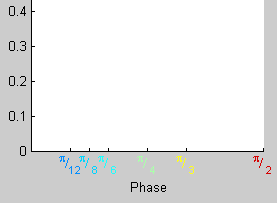 Tickmarks are the only labels in Matlab that do not accept formatting:
it is impossible to include special symbols, vary orientation, color, etc. The workaround is to replace them with
TEXT objects. Unfortunately, some extra not-so-trivial measures have to be taken to ensure the labels stay
in place if the figure is resized or axes are moved. XTICKS function (below) is an attempt to do so.
Tickmarks are the only labels in Matlab that do not accept formatting:
it is impossible to include special symbols, vary orientation, color, etc. The workaround is to replace them with
TEXT objects. Unfortunately, some extra not-so-trivial measures have to be taken to ensure the labels stay
in place if the figure is resized or axes are moved. XTICKS function (below) is an attempt to do so.
This plot has been produced by the following commands:
xl=[12 8 6 4 3 2];
xs=strcat('^{\pi}/_{',cellstr(num2str(xl(:))),'}'); % fills the labels using TeX noation
cl=num2cell(interp1((0:.1:1)'*.5,jet(11),1./xl),2); % create pretty colors
xticks(pi./xl,xs,{'color'},cl);
function h=xticks(varargin)
%XTICKS  enables rich formatting of tickmarks
%  XTICKS(X,LABEL) creates tickmarks at positions X
%  X should be a vector,
%  LABEL may be a cell array of the same size, or char matrix with lenght(X) rows
%  any TeX notation can be used.
%
%  XTICKS(X) creates labels automaticly
%
%  XTICKS(...,'Property',Value,...) passes TEXT properties
%
%  H=XTICKS(...) returns handles of TEXT objects
%
%   Note:
%  Tickmarks created this way are sensitive to YLIM: if it is changed, tickmarks
%  may move. Calling XTICKS without any arguments after changing YLIM restores them.
%
%   Example:
%  XTICKS([0 pi 2*pi],{'Zero','\pi','2\pi'},'rotation',45,'fontsize',14)

% 6/4/01 ashcherbina@ucsd.edu

fig = gcbo;	%if executed as a callback
if isempty(fig), fig=gcf;end

u = findobj(fig, 'Tag','SpecialXTick');
if ~isempty(u)
   axs = get(u,'parent');
   axs=cat(1,axs{:});
else
   axs=[];
end

% if moving, just update all ticks
if (isempty(varargin) & ~isempty(u))
   if length(u)==0 set(gcbo,'ResizeFcn',[]);return; end;
   for ax=unique(axs)'
      tm=u(axs==ax); %ticks belonging to this axis
      tm=sort(tm);
      pos=get_positions(ax);
      set(tm,{'position'},pos);
   end
   return;
end
% get ticks and labels
ax=gca;
xpos=get(ax,'Xtick');
str=cellstr(get(ax,'XtickLabel'));
if ~isempty(varargin) & ~isstr(varargin{1}),
   xpos=varargin{1};
   set(ax,'Xtick',xpos);
   str=cellstr(get(ax,'XtickLabel'));
   if length(varargin)>1 & length(varargin{2})>1,
      str=varargin{2};
      if ~iscell(str),  str=cellstr(str);end;
      varargin={varargin{3:end}};
   else
      varargin={varargin{2:end}};
   end
   xpos=xpos(:);
   str={str{:}}';
   visible=(xpos>=min(xlim) & xpos<=max(xlim));
   xpos=xpos(visible);
   str={str{visible}}';
   set(ax,'Xtick',xpos);

end

if ~isempty(axs)
   tm=u(axs==ax); %ticks belonging to the current axis
   if ~isempty(tm)
      % ticks exist - delete them
      delete(tm);
   end
end

% fix limits & tickmarks
ylim(ylim);
xlim(xlim);

set(ax,'XtickMode','MANUAL','XtickLabelMode','MANUAL','Xticklabel',[]);

pos=get_positions(ax);
N=length(pos);

%create text objects
hh=text(zeros(N,1),zeros(N,1),str);
hh=sort(hh);
set(hh,{'position'},pos,...
   {'string'},str,...
	'horizontalalignment','center',...
   'clipping','off',...
   'Tag','SpecialXTick',...
   varargin{:});
set(gcf,'ResizeFcn','xticks');	% establish figure callback
if nargout>0, h=hh;end;

%%%%%%%%%%%%%%%%%%%%%%%%%%%%%%%%%%%%%%%%%%%%

function pos=get_positions(ax)
YSPACE=10;	 %spacing between the axis and the labels, points
unit=get(ax,'units');
set(ax,'units','points');
rect=actual_pos(ax);
set(ax,'units',unit);

xpos=get(ax,'Xtick');
yl=get(ax,'Ylim');
y=yl(1)-YSPACE/rect(4)*diff(yl);
ypos=repmat(y,1,length(xpos));
zpos=0*ypos;
pos=num2cell([xpos(:),ypos(:),zpos(:)],2);

%%%%%%%%%%%%%%%%%%%%%%%%%%%%%%%%%%%%%%%%%%%%%%%
function rr=actual_pos(ax)
% ACTUAL_POS - get the *actual* axis position
%	r=ACTUAL_POS(AX) returns the actual axis rectangle, which may be
%	different from get(AX,'Position') if data aspect is set manually.
%  If called without arguments, gca assumed

% ashcherbina@ucsd.edu, 2000

if nargin==0 ax=gca;end;
r=get(ax,'position');
rr=r;
if strcmp(get(ax,'DataAspectRatioMode'),'manual')
   dar=get(ax,'DataAspectRatio');
   units = get(ax,'units');
   set(ax,'units','pixels');
   r=get(ax,'position');
   set(ax,'units',units)
   xl=diff(xlim)./dar(1);
   yl=diff(ylim)./dar(2);
   p_r=yl/xl;	 %plot ratio
   b_r=r(4)/r(3);% box ratio
   if (p_r>b_r) %vertical positions are correct
      % actual width
      ax=r(4)/p_r;
      %extra width
      ex=(r(3)-ax)/2;
      rr(1)=rr(1)+ex/r(3)*rr(3);
      rr(3)=ax/r(3)*rr(3);
   else % horizontal positions are correct
     % actual height
      ax=r(3)*p_r;
      %extra height
      ex=(r(4)-ax)/2;
      rr(2)=rr(2)+ex/r(4)*rr(4);
      rr(4)=ax/r(4)*rr(4);
   end
end